
Games
Freeze Nova Cloud Stream Free Games


Finding a free online game should be simple. You open a website, choose something interesting, and start playing. There should be no complicated installation or lengthy setup before the fun begins.
That is the idea behind Freeze Nova Cloud Stream Free Games. FreezeNova offers a collection of browser-based games covering racing, shooting, puzzles, sports, and multiplayer challenges.
Players can access the collection through FreezeNova’s cloud gaming website. Many games run directly in a browser, making them convenient for people who want a quick break without installing large files.
But there is one important distinction. The word “cloud” in the website address does not establish that FreezeNova operates like a remote game-streaming service. Its documented offering is primarily browser gaming.
This guide explains what FreezeNova is, how to play its games, what you can find, and what to check before using the platform.
What Is Freeze Nova Cloud?
Freeze Nova Cloud refers to the browser gaming collection available at cloud.freezenova.com.
The website belongs to the broader FreezeNova gaming brand, which develops and publishes online games.
According to FreezeNova’s official About page, the project was created by developer Marin Cristian-Ovidiu. The company says FreezeNova began as an independent gaming brand before becoming a startup in 2019.
Its purpose is straightforward: provide free games that people can access online.
The website includes different categories, from driving simulators and action games to puzzles and simple arcade challenges.
There is no need to treat FreezeNova as a replacement for a gaming console. It serves a different purpose, offering accessible browser games for shorter, casual sessions.
How to Play Freeze Nova Cloud Stream Free Games
Getting started is relatively easy because most of the experience takes place inside your browser.
-
Visit cloud.freezenova.com.
-
Browse the available games or choose a category.
-
Select a game that interests you.
-
Allow the game to load in your browser.
-
Read its controls and begin playing.
The exact controls depend on the title.
A driving game might use the arrow keys or WASD controls. A shooting game may need both the keyboard and mouse. A puzzle game could require only clicks or taps.
Check the instructions for the individual game rather than assuming every title works the same way.
If you are using a phone, remember that some browser games are better suited to a keyboard.
Is FreezeNova Really a Cloud Gaming Service?
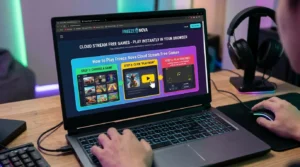
The term cloud gaming can describe different technologies.
In traditional cloud game streaming, a game runs on a remote computer. The service sends the resulting video to your device, while your controls travel back to the server.
FreezeNova’s documented browser collection works differently.
Its website promotes games that can be opened and played through a web browser. The available pages do not establish that every game is rendered on remote gaming hardware and streamed as video.
That distinction matters because it changes what players should expect.
A browser game may depend on the performance of your own device, including how efficiently its browser handles graphics.
A remotely streamed game depends heavily on the connection between your device and the server.
FreezeNova is best understood as a free browser gaming platform unless a particular game or service documents a different technical arrangement.
What Games Can You Play on FreezeNova?
FreezeNova’s official game collection includes several genres. This makes it possible to move between different kinds of games without visiting a separate website each time.
Racing and Driving Games
Driving games are a major part of the collection.
Titles listed on FreezeNova include Highway Racer Pro, Drift King, Burnout City, and Moto X3M.
These games appeal to players who enjoy controlling vehicles, completing tracks, or improving their performance over repeated attempts.
Not every racing game follows the same rules. Some focus on speed, while others challenge you to handle obstacles or difficult turns.
If you are new to the category, begin with a game that has simple controls before trying more demanding driving challenges.
Shooting and Action Games
FreezeNova also lists shooting games such as FPS Strike, Funny Shooter Bro, Squad Shooter, and Counter Craft.
These titles offer different styles of action, from first-person shooting to more playful combat challenges.
Before starting, check whether a game includes multiplayer features and what controls it requires.
Some action games may also contain violence or intense scenes, so the individual game’s content matters when choosing something suitable for younger players.
Puzzle and Skill Games
Not everyone wants a fast-paced game.
FreezeNova includes titles such as Watermelon Suika, Hexa Puzzle, Block Blast, and Chess.
Puzzle games can be a comfortable option when you want something less demanding on your reflexes.
For example, a matching puzzle asks you to recognize patterns and make choices. A chess game requires a different kind of attention, involving planning and anticipating moves.
Both can offer an interesting challenge without the constant movement of a racing game.
Multiplayer and Two-Player Games
Playing with someone else can make even a simple game more entertaining.
FreezeNova lists games such as Basketball Stars and other multiplayer or two-player titles.
However, a two-player label does not always mean the game supports online matches.
Some games allow two people to share one keyboard, while others connect players over the internet.
Read the individual game’s description to understand how its multiplayer mode works.
Do You Need to Download FreezeNova Games?
For the browser-based collection, separate game downloads are generally unnecessary.
You choose a title, wait for it to load, and play in the browser.
That is useful if you do not want to install several applications just to try different games.
FreezeNova also has an Android app listed on Google Play. That app is a separate product and should not be confused with the entire browser library.
If your main goal is to play online, start with the official website.
Avoid downloading files from unfamiliar pages claiming to provide special FreezeNova versions or unlocked features.
Can You Play FreezeNova on a Chromebook?
Browser gaming can be especially appealing on Chromebooks because many of these devices are used for web-based tasks.
FreezeNova’s games may work on a Chromebook when the browser supports the title and the device has sufficient performance.
However, compatibility is not identical across all games.
A simple puzzle might work comfortably on a modest device, while a detailed 3D driving game could be more demanding.
If a game feels slow, close unnecessary tabs and try reducing available graphics settings.
It is also worth checking whether the game requires keyboard controls that your device can provide.
For managed school Chromebooks, access may depend on the institution’s network and device policies.
Are FreezeNova Games Free?
FreezeNova presents its browser collection as a free gaming platform.
The company promotes access to games without requiring players to purchase each title individually.
That does not necessarily mean every part of the experience is free from advertising or optional features.
You may encounter ads while browsing or loading games.
Before making any payment or creating an account, check the terms shown for the particular service or feature.
For someone looking for casual entertainment, the browser collection is the most straightforward place to begin.
Is FreezeNova Safe to Use?
The official FreezeNova website provides a recognizable starting point, but no online gaming platform should be treated as completely risk-free.
The safest approach is to use the published website address rather than a random link shared in a comment or message.
Check the address carefully, especially when searching for unblocked games. Similar-looking domains can make it difficult to tell which website you are visiting.
You should also avoid downloading unfamiliar browser extensions or files that claim to improve game performance.
FreezeNova describes community and chat features on its official website. If you use them, avoid sharing personal details with strangers.
For younger players, game content and communication features deserve attention from parents or guardians.
Being able to open a game in a browser does not automatically establish that its content or community features are suitable for every age.
Can You Play FreezeNova Unblocked Games at School?
FreezeNova markets part of its collection as unblocked browser games.
That description refers to games intended to be accessible through ordinary web browsers, including in environments where gaming websites may be restricted.
It does not guarantee access from every school, office, or public network.
Institutions can set their own website filters and acceptable-use policies.
If a school or workplace blocks a gaming page, the appropriate choice is to follow its network rules rather than attempting to bypass its restrictions.
For personal devices and permitted networks, the official FreezeNova website offers a convenient way to explore the collection.
What if FreezeNova Games Are Not Loading?
A browser game can fail to load for several reasons. Sometimes the problem is temporary, while other issues relate to the device or browser.
Start by refreshing the page.
If the problem continues, check whether your internet connection is working and try another game on the same website.
This can help you determine whether the issue affects one title or the entire collection.
You can also try updating your browser or closing unnecessary tabs.
Some games rely on browser technologies such as JavaScript and WebGL, so disabled settings or unsupported graphics features may prevent them from running correctly.
If the website itself is unavailable, try again through its official homepage rather than relying on unknown copies.
Is FreezeNova Worth Trying?
FreezeNova makes sense for players who want a variety of casual games in one browser-based location.
Its main appeal is convenience. You can move from a driving game to a puzzle or sports challenge without installing a separate application for every title.
There are limits to that convenience.
Some games may perform better on particular devices, while others may not offer the depth or presentation expected from large PC and console releases.
The platform is also not evidence that every listed game has been independently tested for quality or security.
A useful way to judge it is to start with one game you recognize, check how it performs, and explore other categories if the experience suits you.
Conclusion
Freeze Nova Cloud Stream Free Games offers a straightforward way to discover browser-based entertainment.
The FreezeNova collection includes driving, shooting, puzzle, sports, and multiplayer games that can be accessed online without installing each title separately.
The important distinction is that browser gaming should not automatically be confused with remote cloud game streaming.
If you want a quick game without a complicated setup, start with the official FreezeNova website, choose a title, and see how well it works on your device.
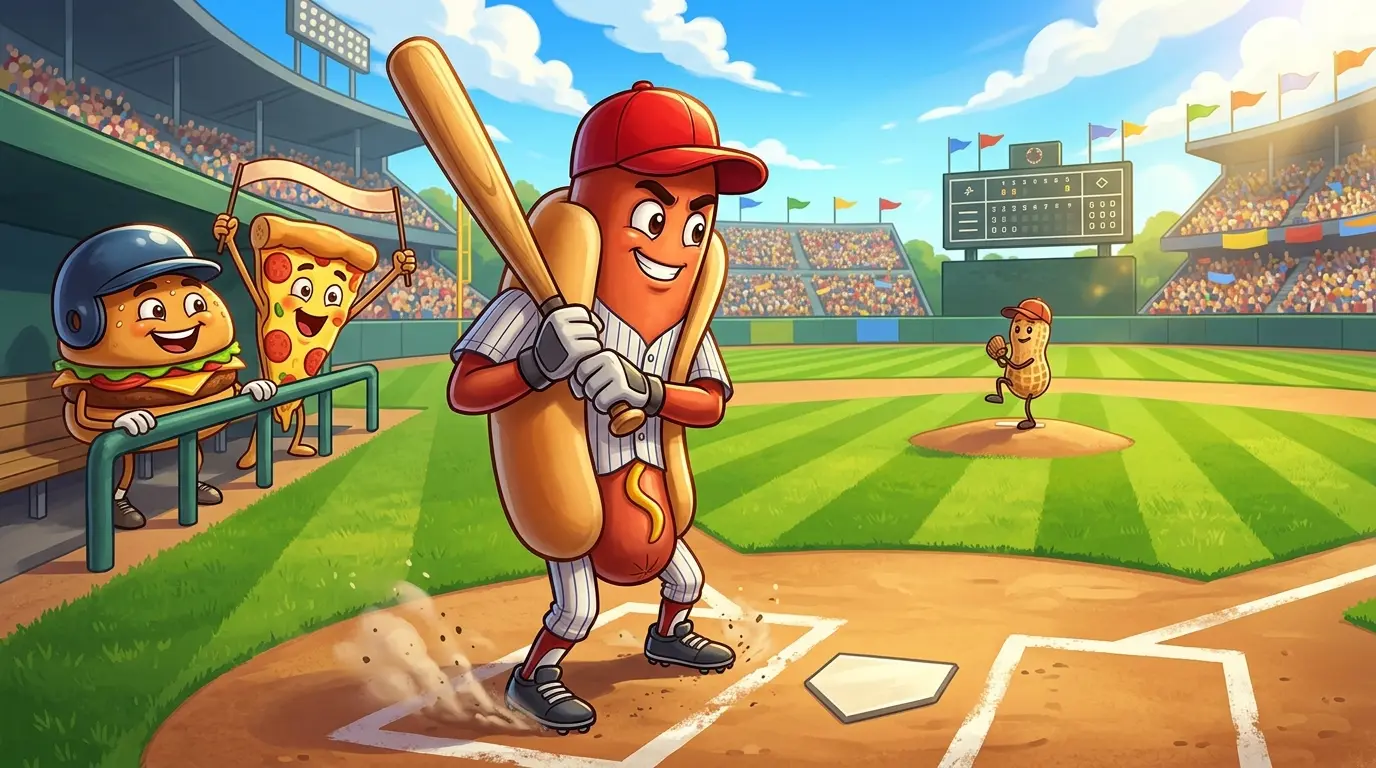
Google Doodle Baseball is one of those simple browser games that can keep you playing longer than expected. You do not need a controller, a gaming computer, or even much knowledge of baseball. Just watch the ball, time your swing, and see how many runs you can score.
The game first appeared as Google’s Fourth of July Doodle in 2019. Instead of ordinary baseball players, it features animated food characters, including hot dogs, hamburgers, and slices of pizza.
The good news is that you can still access the original game through Google’s official Doodle archive. You do not need to wait for Independence Day or install anything.
Here is how to start playing, understand the controls, and improve your score.
Where to Play Google Doodle Baseball Right Now
The easiest way to find the original game is through Google’s archived Fourth of July 2019 Doodle.
You can open it using either of these official links:
Play Google Doodle Baseball on Google
Visit the Official Google Doodle Baseball Archive
The first link opens the game directly. The second takes you to Google’s original Doodle page, which includes the game’s background and characters.
Google’s archive identifies the game as an interactive backyard barbecue baseball experience created for U.S. Independence Day.
If you search for the game manually, look for the original 2019 version rather than downloading an unfamiliar app or opening an unofficial copy.
How to Play Google Doodle Baseball
Getting started takes only a few steps.
-
Open the official Google Doodle Baseball link.
-
Click or tap the Play button to begin.
-
Watch the pitcher prepare to throw the baseball.
-
Click your mouse, tap the batting control, or use the spacebar to swing.
-
Try to hit the ball at the right moment and score runs.
-
Keep playing until you reach three strikes.
The game handles running and fielding automatically. Your main job is timing each swing.
You do not need to choose a batting direction or move a player around the field. That simplicity is what makes the game easy to learn.
Google Doodle Baseball Controls on PC and Mobile
The controls are designed to work with ordinary browser input.
| Device | How to swing |
|---|---|
| Desktop or laptop | Click the batting control with your mouse |
| Keyboard | Press the spacebar |
| Android phone | Tap the batting control |
| iPhone or iPad | Tap the batting control |
The important part is not how quickly you press the button. It is when you press it.
A swing made too early can miss the ball completely. Waiting too long can produce the same result.
Start by following the pitch rather than clicking repeatedly.
Understand the Rules Before Trying for a High Score
Google Doodle Baseball is a simplified version of baseball. It does not require you to manage a team or play a full nine-inning match.
Your goal is to keep hitting the ball and collecting runs.
A successful hit can send your food character around the bases. Better contact may produce a home run, allowing you to score more.
Three strikes end your session, so every missed opportunity matters.
You may also notice that the pitchers change their delivery as the game continues. Some pitches are easier to follow, while others move in less predictable ways.
That means timing becomes more challenging as you play.
Tips to Score More Runs in Google Doodle Baseball
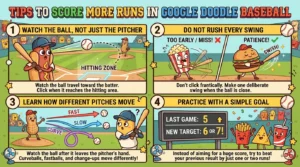
There is no need to learn complicated strategies, but a few habits can improve your results.
Watch the Ball, Not Just the Pitcher
It is tempting to swing as soon as the pitcher starts moving. That often leads to an early miss.
Instead, watch the ball travel toward the batter.
Try to click when it reaches the hitting area. After a few pitches, you should begin to recognize the timing.
Do Not Rush Every Swing
Clicking repeatedly does not guarantee a hit.
A better approach is to make one deliberate swing when the ball is close enough.
If you are struggling, focus on making contact before worrying about home runs.
Learn How Different Pitches Move
Some pitches travel more directly toward the batter. Others curve or change speed.
Pay attention to how the ball moves after leaving the pitcher.
A pitch that looks fast at first may need a different response from one that travels more slowly.
Practice With a Simple Goal
Instead of aiming for an enormous score immediately, try improving your previous result.
For example, if you scored five runs in your last game, aim for six or seven.
That gives you a useful measure of improvement without turning a casual browser game into a complicated challenge.
Meet the Food Characters in Google Doodle Baseball
One of the game’s most memorable features is its unusual team of baseball players.
Google turned familiar American summer foods into animated characters with playful names.
Its official Doodle archive features a collection of baseball-style character cards, including H-Dog, a hot dog; Triple, a hamburger; Wild Slice, a pizza slice; The Cobbra, corn on the cob; 2 Scoops, an ice-cream cone; The Sauce, a ketchup bottle; Big Red, watermelon; and Sluggin Surloin, a steak.
The characters add personality to an otherwise simple game.
They also help explain why this Doodle remains recognizable years after its original release.
Google’s Fourth of July 2019 page shows the character lineup and credits the people who developed the game.
Can You Play Google Doodle Baseball on Your Phone?
Yes. Google Doodle Baseball was released for mobile browsers as well as desktop devices.
The mobile version uses touch controls, so you can swing without connecting a keyboard or mouse.
9to5Google
Open the official game link in your phone’s browser and follow the on-screen prompts.
Because the gameplay involves only one main action, it is well suited to short sessions on a touchscreen.
You can play a few rounds during a break without learning a complicated control system.
What if Google Doodle Baseball Is Not Working?
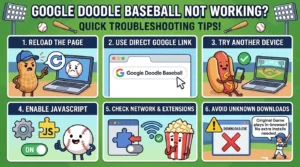
An archived browser game may occasionally fail to load properly.
If you see a blank screen or the game does not start, first reload the page.
You can also try opening the direct Google game link instead of the archive page.
If that does not help, try an updated browser or another device. Make sure JavaScript is enabled, since interactive browser games depend on it.
Browser restrictions, extensions, or network settings can sometimes interfere with interactive content.
Avoid downloading unknown programs that claim to repair or unlock the game. The original Google Doodle does not require a separate installation.
Why Is Google Doodle Baseball Still Popular?
Google Doodle Baseball offers something that many larger games do not: an easy way to start having fun without preparation.
There is no long introduction, complicated menu, or collection of equipment to manage.
You simply open the page and begin swinging.
The food characters also make the experience different from ordinary sports games. A hot dog batting against a team of peanuts is a funny idea, but the timing challenge gives players a reason to continue.
The game was originally a holiday celebration, yet its design works just as well outside that occasion.
That combination of familiar rules, humorous animation, and quick gameplay helps explain its lasting appeal.
Is Google Doodle Baseball Free?
Yes. The original Google Doodle Baseball is a free browser game.
You do not need a paid subscription or a separate gaming account to access the archived game.
It is also different from a full baseball simulator. You cannot manage professional teams or customize every part of a match.
The experience focuses on one simple action: hitting a pitch at the right moment.
For someone looking for a quick game, that may be exactly what makes it enjoyable.
Conclusion
Google Doodle Baseball is still an easy game to revisit. Open the official 2019 Doodle, start playing, and practice timing your swings as the pitches become more difficult.
The rules are simple enough for beginners, while scoring more runs gives returning players a reason to improve.
If you have a few minutes and want something light to play in your browser, Google’s food-themed baseball game remains a fun choice.
-

 News5 days ago
Fintechzoom.io Nasdaq: The Future Of Financial Innovations
-

 Technology5 days ago
Drovenio Latest Technology News: The Future Of Next-Gen AI Innovations
-

 Home & Living5 days ago
Homecz: The Ultimate Guide to Modern Smart Home Living
-
 Entertainment5 hours ago
How to Play Google Doodle Baseball Right Now
-

 Technology4 hours ago
Troozer.com: What Is It and Can You Trust It?
-

 Health & Wellness1 hour ago
Lyposingrass: What Is It and Is It a Real Plant?
-
 Technology21 minutes ago
How to Clear Cache for a Specific Website