
Technology
Cyanová: What It Means and How It’s Used in Modern Design


Cyanová has an unfamiliar sound, but the color behind the name is easy to recognize. It brings to mind the vivid blue-green shades used in digital graphics, contemporary branding, and interior accents.
The word is connected to cyan, the familiar blue-green color used in digital design and printing. The form cyanová resembles Czech and Slovak feminine adjective forms used to describe color, although its exact linguistic usage should be confirmed through a specialist dictionary.
Some English-language websites also use it as a descriptive label for cyan-inspired palettes, although this does not make it an official color name.
There is one important distinction: Cyanová is not a separately standardized color with its own official shade code. Cyan is an established color, while Cyanová is better understood as a descriptive term whose exact appearance depends on context.
That difference matters when turning an attractive color idea into something a designer can actually reproduce.
Where Does the Word Cyanová Come From?
The most useful clue is the word’s ending.
In Czech and Slovak, descriptive words change their endings according to grammatical gender. The feminine form cyanová is related to cyanový, meaning cyan-colored.
For example, the Czech phrase cyanová barva refers to a cyan color. The ending reflects the grammar of the phrase rather than identifying a different shade.
The English word cyan has a much longer history. It ultimately comes from the Greek word kyanos, meaning dark blue. The modern English color term appeared much later and came to describe the familiar greenish-blue shade.
Today, cyan is an established term in color reproduction, digital displays, and printing.
English-language websites have also started using Cyanová as a creative name for cyan-inspired colors. That usage can be useful for describing an aesthetic, but it should not be confused with a formal color classification.
What Color Is Cyanová?
The simplest visual reference is cyan: a bright color combining blue and green.
Pure digital cyan has a particularly vivid appearance because it uses the full green and blue channels in the RGB color model, with no red.
For reference, Figma’s cyan color guide identifies pure cyan using the following values:
| Color specification | Value |
|---|---|
| HEX | #00FFFF |
| RGB | 0, 255, 255 |
| HSL | 180°, 100%, 50% |
| CSS keyword | cyan |
In CSS, cyan and aqua are interchangeable color keywords. Both represent the same HEX value, #00FFFF.
Someone using the word Cyanová in a design brief could mean vivid cyan, a soft aqua, a deeper teal, or a palette of related blue-green tones.
A professional design therefore needs an exact color value rather than a descriptive name alone.
Cyan, Turquoise, and Teal: What’s the Difference?
These colors belong to the same general blue-green family, but they produce noticeably different results.
Cyan is bright and highly saturated in its pure digital form. Turquoise often has a softer, more natural appearance, while teal is substantially darker.
A few familiar web colors illustrate the difference:
| Color | HEX code | General appearance |
|---|---|---|
| Cyan | #00FFFF | Bright blue-green |
| Turquoise | #40E0D0 | Softer tropical blue-green |
| Teal | #008080 | Dark, muted blue-green |
| Dark Cyan | #008B8B | Deep cyan |
| Light Cyan | #E0FFFF | Very pale blue-green |
These values correspond to recognized CSS color names documented by MDN Web Docs.
The differences become important when creating a brand identity.
A vivid cyan button may draw immediate attention on a dark website. A teal background may feel more restrained, while a pale cyan wall can introduce color without dominating an interior.
All three can contribute to a Cyanová-inspired design, provided the intended shades are clearly specified.
How Cyan-Inspired Colors Work in Website Design
Cyan is particularly useful in digital interfaces because it can create a clear visual contrast against dark backgrounds.
Consider a website with a charcoal navigation bar, white body text, and cyan accents. The cyan can highlight selected links, progress indicators, or important interface elements without requiring the entire page to use a bright color.
On a light background, however, highly saturated cyan can become harder to read when used for text.
Designers need to consider more than whether a color looks attractive.
The Web Content Accessibility Guidelines recommend a minimum contrast ratio of 4.5:1 for ordinary text and 3:1 for large text at Level AA, subject to specified exceptions.
Pure cyan (#00FFFF) has a contrast ratio of 16.75:1 against black, but only 1.25:1 against white. This makes it suitable for certain dark-background accents, but unsuitable for ordinary text on a white background under WCAG AA contrast requirements.
For this reason, cyan works better as an accent than as a universal text color. Darker cyan shades may be more appropriate for links and text on white backgrounds, but each chosen combination should be tested.
A well-designed interface balances visual identity with readability.
Using Cyanová in Branding and Graphic Design
A cyan-inspired palette can give branding a crisp, contemporary appearance.
It is a possible choice for digital products, creative agencies, educational platforms, or businesses that want a distinctive blue-green visual identity.
Yet a color alone does not communicate the same message to every audience.
The meaning people attach to cyan can depend on surrounding colors, cultural expectations, typography, and the product itself.
A bright cyan logo paired with black lettering might suit a technology-focused brand. The same shade combined with warm neutrals could work for a lifestyle business.
Consistency matters more than the label applied to the palette.
For example, a designer preparing a brand guide should specify the exact HEX or RGB values for screens, suitable print specifications, and acceptable variations for different backgrounds.
Calling a brand color Cyanová may provide a memorable creative description, but the technical specifications are what make consistent reproduction possible.
Can Cyanová Work in Interior Design?
Blue-green colors can also be useful in rooms where a designer wants a noticeable but controlled accent.
The most effective approach is often to choose one prominent feature rather than covering every surface with the same strong shade.
A pale cyan wall, for instance, can work alongside light wood furniture, cream upholstery, and simple white shelving.
A darker teal or cyan-toned cabinet may provide a stronger contrast in a kitchen or living room.
In a home office, blue-green accessories can introduce color without requiring major changes to furniture or walls.
Lighting makes a significant difference.
A color that looks bright on a phone screen may appear different on painted plaster, fabric, or ceramic surfaces. Daylight, artificial lighting, surface texture, and neighboring materials all influence the result.
Before choosing a paint color, test a physical sample in the actual room at different times of day.
There is no universal Cyanová paint formula, so selecting an established manufacturer’s specific shade is more reliable than trying to match the name alone.
Building a Practical Cyanová-Inspired Color Palette
A successful palette needs more than several similar shades arranged together.
The colors should perform different jobs.
For a contemporary website or visual identity, a practical starting palette might include:
| Role | Suggested color | HEX |
|---|---|---|
| Main accent | Vivid cyan | #00FFFF |
| Strong accent | Dark cyan | #008B8B |
| Soft background | Light cyan | #E0FFFF |
| Neutral background | White | #FFFFFF |
| Dark foundation | Charcoal | #1F2933 |
These are suggested design choices, not official Cyanová color codes.
The vivid cyan can introduce energy, while charcoal and white provide a more stable visual foundation.
Light cyan works for backgrounds and decorative sections. Dark cyan can help add depth.
Actual text and interface combinations should still be checked for accessibility.
The palette can be adjusted according to the project. A minimalist website may use only one cyan accent, while a digital illustration may benefit from several related blue-green tones.
What Designers Should Know Before Using the Name
The biggest practical problem with Cyanová is ambiguity.
Imagine a designer receiving a request for a Cyanová-themed website.
One person might interpret that as bright turquoise buttons and white backgrounds. Another might create a dark teal interface with subtle blue-green gradients.
Both could reasonably associate their work with the word, but the results would be very different.
A better design brief identifies the intended colors, provides visual references, and explains how those colors should be used.
This also matters when working between digital and print formats.
Colors produced by an illuminated display do not always reproduce identically with printing inks. Paper type, printing conditions, and color profiles can change the final appearance.
The solution is not to avoid descriptive color names. It is to support them with measurable specifications.
Cyanová can help communicate a visual direction, while exact color values turn that direction into a repeatable design.
Conclusion
Cyanová is best understood as a descriptive expression connected with the familiar blue-green color cyan, rather than a newly standardized color.
Its unusual spelling comes from a linguistic context, while its appearance in modern design discussions reflects the flexibility of cyan-inspired color palettes.
For creative work, the name can communicate a useful visual direction. For professional results, however, designers should define the exact shades, test color combinations, and consider accessibility and printing requirements.
The name may be distinctive, but a successful design depends on the colors chosen and how thoughtfully they are used.
FAQs
What does Cyanová mean?
Cyanová is a color-related expression connected with cyan. In Czech and Slovak, it can function as a feminine adjective meaning cyan-colored.
Is Cyanová a real color?
It is a real color-related word, but it is not established as a separate standardized color. Its clearest reference is the recognized color cyan.
What is the HEX code for Cyanová?
There is no universal HEX code specifically assigned to Cyanová. Pure digital cyan uses #00FFFF.
Is Cyanová the same as turquoise?
Not necessarily. Cyanová is associated with cyan, while turquoise is a recognized blue-green color with its own commonly used specifications.
Can Cyanová be used in website design?
Yes. Designers can use cyan or related blue-green shades in interfaces, branding, and illustrations. Exact color values and accessibility checks are important.
Is Cyanová a modern design trend?
The word appears in contemporary online design discussions, but there is insufficient evidence to identify it as a formally recognized or independently established design movement.
What colors go well with Cyanová?
White, charcoal, gray, cream, and natural wood tones can complement cyan-inspired colors. The best combination depends on the chosen shade and intended application.

The name Snapjotz.com sounds like something built for capturing ideas. You might imagine opening a digital notebook, writing down a quick thought, and finding it again on your phone or laptop.
That is exactly the impression several online articles create. They describe Snapjotz as a modern note-taking platform, sometimes mentioning cloud storage, AI features, and collaborative workspaces.
But the website associated with that name tells a different story.
A November 2026 review by NetVocab describes Snapjotz.com as a general-interest digital publication rather than a working note-taking application. Its purpose appears to be publishing articles for readers, not storing their personal notes.
The difference is worth understanding before searching for an account, downloading an application, or trusting unfamiliar product descriptions.
What Is Snapjotz.com?
Snapjotz.com is an online publication covering a range of subjects, including technology, business, finance, health, lifestyle, and travel.
Its homepage has described the website as an independent digital media publication. Readers can browse articles, explore categories, and find information on different subjects.
In practice, this is closer to visiting an online magazine than opening a productivity application.
The website does not appear to provide the essential features normally associated with digital notebooks, such as a private note editor, personal folders, synchronized documents, or a workspace dashboard.
An independent investigation published by NetVocab on November 2, 2026, examined several websites using variations of the Snapjotz name. It found no working note-taking application or official mobile app connected to those sites.
That finding makes the distinction between the website’s name and its actual function especially important.
Why Is Snapjotz.com Mistaken for a Digital Notebook?
The confusion begins with the name itself.
A website’s name can create expectations before a visitor even opens it. That seems to be part of the confusion surrounding Snapjotz.com. Someone searching for a place to save quick notes may arrive expecting a productivity tool, only to find a website filled with published articles.
This is more than a naming issue. It changes what visitors should expect from the website, what information they can find there, and whether they need to look elsewhere for a note-taking service.
What Can You Actually Find on Snapjotz.com?
The main documented activity on Snapjotz.com is publishing informational content.
Its articles span several categories, giving readers access to different topics without requiring them to use a specialized application.
Technology content may introduce digital tools or explain online services. Business and finance articles can discuss common concepts, while lifestyle and travel content appeals to a wider audience.
This broad editorial approach is common among general-interest websites.
NetVocab’s November 2026 review reported that Snapjotz.com had 588 published posts in its public WordPress archive. The website itself also describes its purpose as digital publishing.
The experience centers on reading published material rather than creating private documents.
For someone interested in general online information, that may be useful. For someone expecting a digital notebook, it is a different service entirely.
Does Snapjotz.com Offer Real Note-Taking Features?
A conventional digital notebook lets users create, edit, organize, and retrieve their own notes.
Depending on the application, it might also support attachments, searching, offline access, or synchronization between devices.
These are features found in established productivity services such as Microsoft OneNote, Google Keep, and Notion.
Snapjotz.com has not been verified as providing comparable functionality.
The November 2026 NetVocab review did not identify an accessible notebook editor, personal account dashboard, or documented synchronization system on Snapjotz.com.
Its reported findings therefore do not support treating the website as a conventional note-taking application.
Claims about AI-assisted note organization, multimedia storage, and team collaboration therefore remain unsupported.
This does not prevent Snapjotz.com from publishing articles about productivity tools. A website can explain how note-taking software works without offering that software itself.
Readers should avoid confusing the subject of an article with a feature provided by the publisher.
Is There an Official Snapjotz App?
In its November 2, 2026 review, NetVocab reported that it found no official Snapjotz application in the Apple App Store or Google Play. The investigation also did not identify an official app download or registration process connected to the websites it examined.
The examined websites also lacked an identifiable application download or registration process.
That is significant because most genuine productivity applications provide a clear way to start using their products.
A software service typically offers a web application, account registration, official app-store listing, or product documentation.
Without these elements, claims about a downloadable Snapjotz notebook should be approached cautiously.
If an unfamiliar website offers an installation file using the Snapjotz name, verify the publisher and destination before downloading anything.
Why Are There Other Websites With Similar Names?
Another source of confusion is the existence of multiple websites with similar names.
NetVocab’s investigation also examined three similarly named domains: Snapjotzs.com, Snapjotz.net, and Snap-jotz.com.
These are separate domain addresses, and there is no confirmed evidence that all of them belong to the same organization.
Their published descriptions also differ.
Some present themselves as blogs, while others describe digital services that were not supported by an accessible application.
A small change in a domain name can lead to a completely different website. This is why readers should pay attention to the exact address rather than assuming similar names identify the same company.
For this article, the primary subject is Snapjotz.com without additional letters or hyphens.
Is Snapjotz.com Legit and Safe?
Snapjotz.com operates as a publicly accessible content website. NetVocab’s November 2026 inspection reported no harmful homepage scripts or suspicious redirects during its checks. However, this finding does not establish that every article is accurate or guarantee the website’s overall security.
Trustworthiness has several dimensions.
A website may function normally while publishing information that requires further verification. Similarly, an established domain does not automatically guarantee the reliability of every claim it contains.
For ordinary browsing, readers should follow familiar online precautions, including checking the exact URL and avoiding unexpected downloads.
Be careful with any third-party page that asks for payment, passwords, or sensitive information in exchange for accessing a supposed Snapjotz notebook.
No verified note-taking subscription or account system has been established for the main domain.
Who Owns Snapjotz.com?
Snapjotz.com describes itself as an independent digital publication. However, the available information does not clearly identify the person or legal entity operating the website.
Domain registration information may help researchers investigate a website’s history, although privacy protections can limit the personal details shown.
According to the November 2026 investigation, the current registration record for Snapjotz.com dates to August 21, 2023.
The publication has also presented 2023 as its establishment year.
These details provide some context about the domain, but they do not independently verify its ownership or editorial accountability.
Readers can use ICANN Lookup to research publicly available registration details.
When evaluating important information from any publication, clear authorship, credible references, and transparent editorial policies remain useful signals.
Snapjotz.com vs. Real Digital Notebook Apps
The most useful comparison is between what Snapjotz.com has been documented to provide and what established note-taking applications are designed to do.
Google Keep focuses on capturing short notes, lists, and reminders.
Microsoft OneNote provides notebooks organized into sections and pages, making it suitable for longer notes and structured information.
Notion combines documents with databases and workspace organization, appealing to users managing projects and connected information.
These applications have identifiable products and documented features.
Snapjotz.com, by contrast, has been documented primarily as an editorial website.
If you want to read general articles, the website may serve that purpose. If you need to store lecture notes, manage research, or organize personal tasks, a verified note-taking application is a more appropriate choice.
Who Should Use Snapjotz.com?
That depends on what brought you to the website.
If you discovered Snapjotz.com while researching technology, business, or lifestyle information, you may find articles related to your interests.
As with any online publication, important claims should be checked against reliable sources.
If you are specifically searching for a digital notebook, however, the available evidence does not support treating Snapjotz.com as one.
The distinction helps prevent wasted time looking for software features that have not been demonstrated.
It also illustrates a broader problem with online product information: repeated descriptions can make an unverified service seem established.
Checking the actual website and its documented functionality is more useful than relying on a familiar-sounding product name.
Conclusion
Snapjotz.com has an unusual online identity. Its name and numerous third-party descriptions suggest a digital notebook, but documented examinations show something different.
The website primarily functions as a multi-topic digital publication, offering articles rather than a verified note-taking workspace.
There is no established evidence of an official notebook application, synchronized notes, or a dedicated productivity dashboard.
For readers, the conclusion is simple: Snapjotz.com may be useful as an information website, but it should not be mistaken for a confirmed digital notebook service.
Understanding what a website actually offers is always more valuable than trusting what its name appears to promise.
Frequently Asked Questions
What is Snapjotz.com?
Snapjotz.com is a general-interest digital publication covering technology, business, finance, health, lifestyle, and other subjects.
Is Snapjotz.com a digital notebook?
Despite being described that way by some websites, Snapjotz.com has not been verified as a functioning digital notebook or note-taking application.
Is Snapjotz.com free?
Independent examinations found its published articles accessible without a notebook subscription or product account. This does not establish that all future content or services will remain free.
Does Snapjotz.com offer cloud storage?
No verified personal cloud-storage or note-synchronization feature has been established for the website.
Can I download the Snapjotz app?
NetVocab’s November 2, 2026 investigation did not identify an official Snapjotz application in the Apple App Store or Google Play.
Is Snapjotz.com trustworthy?
It has been documented as an operating content website, but the accuracy of individual articles should be assessed through their sources, authorship, and supporting evidence.
Is Snapjotz.com the same as Snapjotz.net?
No confirmed ownership or operational connection has been established between the two domains. They should not automatically be treated as the same service.
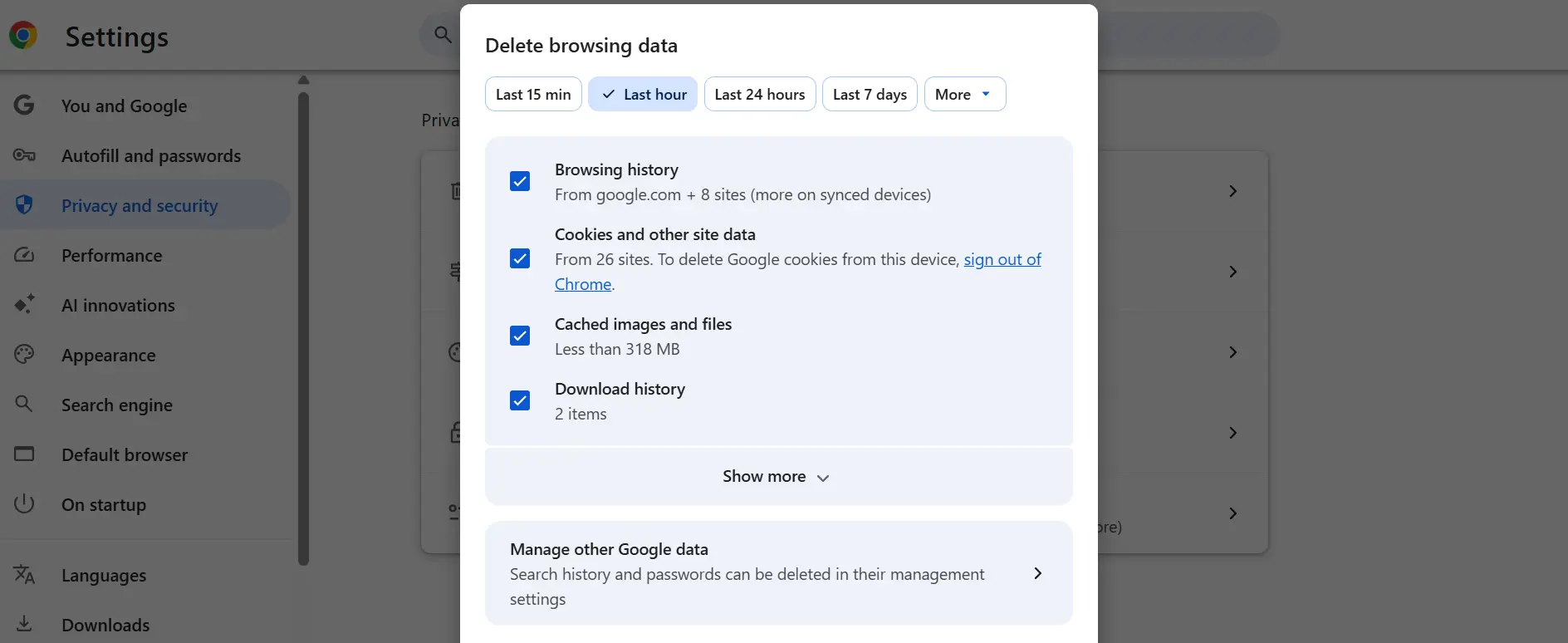
If you need to clear cache for a specific website, you don’t have to delete stored data for every site in your browser. A website may keep showing an old page, refuse to load properly, or get stuck after you sign in.
You can usually remove data for one website through your browser’s settings. Depending on the browser, this may include cached files, cookies, and other saved information. In Chrome, for example, you can find a website under Settings → Privacy and security → Third-party cookies → See all site data and permissions.
The steps differ slightly between browsers. Here’s how to do it.
Learn how to clear cache for a specific website in Chrome, Edge, Firefox, and Safari without deleting data from every site.
How to Clear Cache for One Website in Google Chrome
In Chrome, you can remove the saved data for a particular website without affecting other sites.
-
Open Google Chrome and click the three dots in the upper-right corner.
-
Select Settings.
-
Go to Privacy and security → Third-party cookies.
-
Click See all site data and permissions.
-
Enter the website’s name in the search box.
-
Click the delete icon next to the matching website.
-
Confirm the deletion and reload the page.
For example, if Gmail is having trouble loading, you can look for its stored site data instead of clearing everything from Chrome.
Google explains these steps in its official Chrome cookie management guide.
Keep in mind that deleting site data can sign you out or reset preferences for that website.
How to Clear Cache for One Website in Microsoft Edge
Edge also lets you manage information stored by websites.
-
Open Edge and go to Settings.
-
Open Privacy, search, and services.
-
Find the cookies or site data settings.
-
Open the list of stored website data.
-
Search for the website you want to clear.
-
Delete its stored data and reload the page.
The menu labels may differ depending on your Edge version.
Microsoft’s browser privacy guide explains how Edge handles cookies and browsing data.
How to Clear Cache for One Website in Firefox
If the website is already open in Firefox, you can remove its cookies and site data directly from the address bar.
-
Visit the website in Firefox.
-
Click the padlock or shield icon to the left of the address bar.
-
Select Clear cookies and site data.
-
Confirm the action.
-
Reload the website.
You can also open Settings → Privacy & Security and use the site’s data management options to find and remove stored information.
Mozilla documents both methods in its Firefox support guide.
How to Clear Cache for One Website in Safari
On a Mac, Safari allows you to remove website data individually.
-
Open Safari and select Safari → Settings.
-
Click Privacy.
-
Choose Manage Website Data.
-
Find and select the website.
-
Click Remove, then Done.
This removes data associated with the selected website without requiring you to erase every website’s stored information.
Apple confirms the process in its Safari support documentation.
Can You Refresh a Website Without Clearing Its Data?
Yes. If your only problem is an outdated image or page, try a hard refresh before deleting anything.
On Windows, press Ctrl + Shift + R or Ctrl + F5 while the website is open. On a Mac, Chrome and Firefox support Command + Shift + R.
A hard refresh tells the browser to reload the page’s resources instead of simply reusing its usual cached copies. The exact behavior can vary by browser. It does not necessarily delete all stored files or cookies.
This is worth trying first, especially if you want to stay signed in.
What Happens After You Clear a Website’s Cache?
The website may take a little longer to load the next time you visit because your browser needs to retrieve fresh resources.
If you removed cookies and other stored site data, you may also need to sign in again. Saved website preferences or locally stored information may be reset.
Your bookmarks and data belonging to unrelated websites are generally unaffected when you remove only the selected site’s data.
Removing website data can affect more than cached images and files. Depending on the browser, it may also delete cookies, sign you out, or reset saved preferences. If you only need to load an updated page, a hard refresh is worth trying first.
Conclusion
You don’t need to clear your entire browser cache whenever one website stops working. Start with a hard refresh. If the problem continues, find that website in your browser’s site data settings and remove its stored information.
It’s a targeted way to troubleshoot loading problems while leaving most of your other browsing data alone.

Troozer.com has attracted attention because different websites describe it in different ways. Some refer to it as a digital publishing platform, while others associate the name with AI tools, online shopping, or business software.
The clearest description comes from Troozer’s own public statement, which identifies it as a digital media and publishing platform. It also says the website is not a marketplace, financial service, or software tool.
That distinction matters when trying to understand what visitors should actually expect from Troozer.com. Here’s what its public information tells us, what remains unclear, and how readers can assess the website.
What Is Troozer.com?
Troozer.com describes itself as a digital media and publishing platform. Its stated purpose is to deliver editorial content across multiple subject areas.
This makes it closer to a general-interest online publication than a dedicated software application or shopping website.
Troozer’s public statement also says that visitors do not need to create an account or provide payment details to access its content. However, these details come from the platform’s own description and should not be confused with an independent assessment of its operations.
For readers, the main distinction is simple: Troozer presents itself as a place to access articles, not as a service offering business software or online transactions.
What Can You Find on Troozer.com?
Troozer’s public statement identifies ten subject areas across its publishing platform:
- Technology
- Finance
- Business
- Health
- Education
- Lifestyle
- Travel
- Law
- Home improvement
- Real estate
This is a broad editorial range, covering everything from digital developments and money-related topics to everyday interests and property.
The presence of these categories helps explain why Troozer describes itself as a multi-topic publication rather than a specialist website.
However, a category list alone does not establish the quality or accuracy of individual articles. Readers should still look at the sources, publication dates, and evidence behind the information they find.
Why Are There Different Descriptions of Troozer.com?
The confusion surrounding Troozer.com largely comes from descriptions published by different websites.
Some third-party articles associate the name with AI tools, cloud storage, productivity software, or online shopping. These descriptions do not match Troozer’s own stated identity as a publishing platform.
There is not enough evidence to establish exactly why these different descriptions appeared. They may reflect repeated third-party claims, outdated information, or confusion about the services associated with the name.
The important point is that a claim repeated across several websites does not automatically become verified.
When researching an unfamiliar platform, its own published information and demonstrable features are more useful than unsupported descriptions elsewhere.
Is Troozer.com Legit?
Troozer.com identifies itself as a digital publishing platform through its public statement. This provides some information about the website’s intended purpose.
However, that description does not independently establish its legal ownership, business registration, or editorial standards.
It would therefore be premature to describe Troozer.com as completely verified or to label it a fraudulent website without stronger evidence.
A sensible assessment separates two questions: whether a website has an identifiable publishing purpose and whether its ownership and published information can be independently trusted.
For Troozer.com, the first has a public explanation. The second still requires further verification.
Is Troozer.com Safe to Use?
Troozer describes its website as an open-access publishing platform and says readers do not need to provide payment details or create an account to access content.
That is useful information about its stated reading experience, but it is not an independent security audit.
As with any unfamiliar website, visitors should check the exact domain before browsing, avoid unexpected downloads, and be cautious about requests for personal or financial information.
An HTTPS connection can protect information exchanged between a browser and a website, but it does not guarantee that every claim or activity on that website is trustworthy.
Readers can also consult the Federal Trade Commission’s online security guidance for practical advice about protecting personal information.
Who Owns Troozer.com?
Knowing who operates a publication can help readers judge its credibility.
Troozer’s public statement explains the platform’s publishing purpose, but it does not establish the legal identity of the person or company operating the domain.
That does not automatically indicate suspicious activity. Some publishers operate under business names, while domain registration details may be protected for privacy reasons.
Still, transparent ownership is particularly valuable when a website publishes information about money, health, business decisions, or legal matters.
Readers interested in researching the domain can use ICANN Lookup to review available registration information.
Registration records may help establish certain domain details, although they do not necessarily reveal the individual or company operating the publication.
Until the ownership can be independently confirmed, it is better not to attribute Troozer.com to a particular person or business.
Can You Trust Articles Published on Troozer.com?
Trust should depend on the quality of the individual article, not simply the website’s appearance.
A useful article should answer the reader’s question clearly, distinguish established facts from opinions, and provide appropriate references where necessary.
For example, a technology article discussing a product’s specifications should ideally link to its official documentation.
A health-related article should rely on qualified medical sources rather than unsupported claims. Financial information should also be checked against authoritative publications or original company disclosures.
Readers should pay attention to the author’s identity, the date of publication, and whether the article explains where its information comes from.
If a particular claim could influence an important decision, confirm it through an independent source.
The same standards apply to Troozer.com. Readers should judge individual articles by their evidence, accuracy, authorship, and usefulness rather than assuming that every published claim is reliable.
Does Troozer.com Offer AI Tools or Online Shopping?
Troozer’s public statement specifically says that the website is not an AI software tool, online marketplace, or financial service.
It also states that the platform does not handle transactions or require credit card details for reading its content.
However, readers should distinguish between what the platform says about itself and what has been independently tested. Its public statement provides a clear description of its intended function, but it is not a technical audit of every possible feature.
For now, the most accurate way to describe Troozer.com is as a multi-category digital publishing platform, rather than a confirmed software or shopping service.
FAQs
What is Troozer.com used for?
Troozer.com is primarily described as a general-interest digital publishing website offering informational articles on subjects such as technology, business, education, finance, and lifestyle.
Is Troozer.com a legitimate website?
Troozer identifies itself as a digital publishing platform. However, its legal ownership and editorial practices have not been independently established, so readers should assess its content carefully.
Is Troozer.com free?
Troozer says readers can access its content without payment details or mandatory account creation. Current access conditions should still be checked directly on the website.
Is Troozer.com an AI platform?
Troozer’s public statement says it is not a software tool. Claims that it offers a dedicated AI platform have not been independently established.
Can I trust Troozer.com reviews and articles?
Some articles may be useful, but readers should check authorship, sources, dates, and important factual claims before relying on the information.
Who is the owner of Troozer.com?
The legal owner or operating company has not been independently confirmed through the public information reviewed. Readers can use ICANN Lookup to examine available domain registration details.
Conclusion
Troozer.com is best understood through its own stated purpose: a multi-category digital publishing platform covering subjects such as technology, finance, business, health, education, and lifestyle.
Its public statement also addresses the confusion surrounding descriptions of AI software, online shopping, and other digital services. Those claims should not be treated as confirmed features without supporting evidence.
Questions about legal ownership and independently verified editorial practices remain open.
For readers, the sensible approach is to treat Troozer.com as a source of general articles, examine the evidence behind individual claims, and verify important information through reliable sources.
-

 News5 days ago
Fintechzoom.io Nasdaq: The Future Of Financial Innovations
-

 Technology5 days ago
Drovenio Latest Technology News: The Future Of Next-Gen AI Innovations
-

 Home & Living5 days ago
Homecz: The Ultimate Guide to Modern Smart Home Living
-

 Technology1 day ago
Troozer.com: What Is It and Can You Trust It?
-

 Games1 day ago
Freeze Nova Cloud Stream Free Games
-

 Entertainment1 day ago
How to Play Google Doodle Baseball Right Now
-
 Technology22 hours ago
How to Clear Cache for a Specific Website
-

 Technology11 hours ago
Snapjotz.com: Is It Really a Digital Notebook?